
Faxvio for Mac — Fax software for Mac and MacBook: drop a PDF, send, keep the receipt.
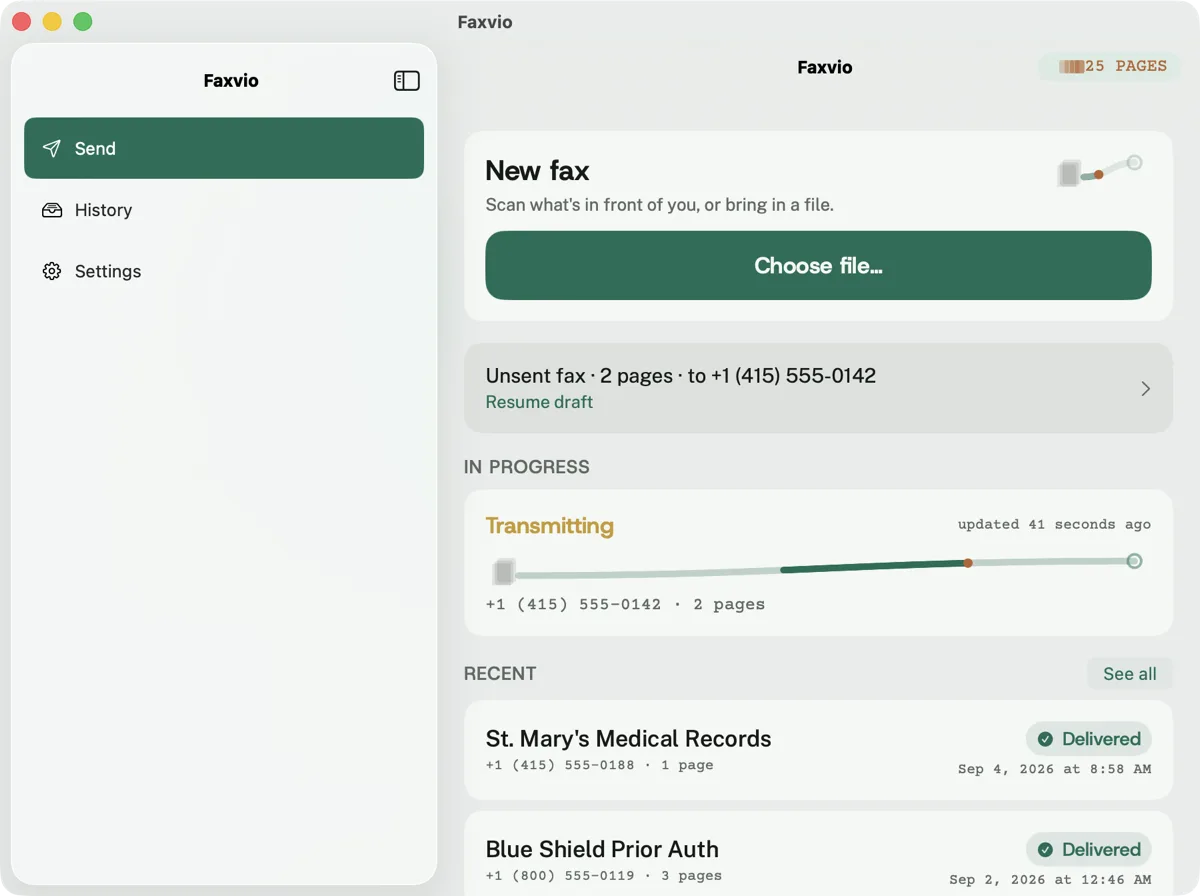
Faxvio is a fax app for Mac that you pay for per page. Drop a PDF on the window, type the fax number and send; a fax reaches Delivered in about a minute, with a PDF receipt the receiving machine confirmed. Pages cost $0.18 to $0.36 in packs that never expire, and there is no account.
Apple M1 or later, macOS 14 or later
Rather not install anything? Send from Safari.
The browser version of Faxvio runs on any Mac, Intel included, in Safari, Chrome or Firefox. Drop the PDF, type the number, and the price is on the Send button before you sign in with Apple, Google or an email code. The prices are the App Store’s.
The app adds what a browser cannot: a window that stays in the Dock, History of every fax, shortcuts, and pages that follow your iPhone with iCloud Keychain.
Free
your first page on the web
$1.09
for up to 3 pages
Any
Mac with a browser
Send it from here
Sign in only when you press Send.
- Pages
- Number
- Send
Ready to go.
Check your email
We sent a 6-digit code to . Type it here to go on.
By continuing you accept the Terms and Privacy policy.
Pages for this fax
One payment, nothing renews. Card, Apple Pay or Google Pay on the next screen.
What Faxvio looks like on a Mac
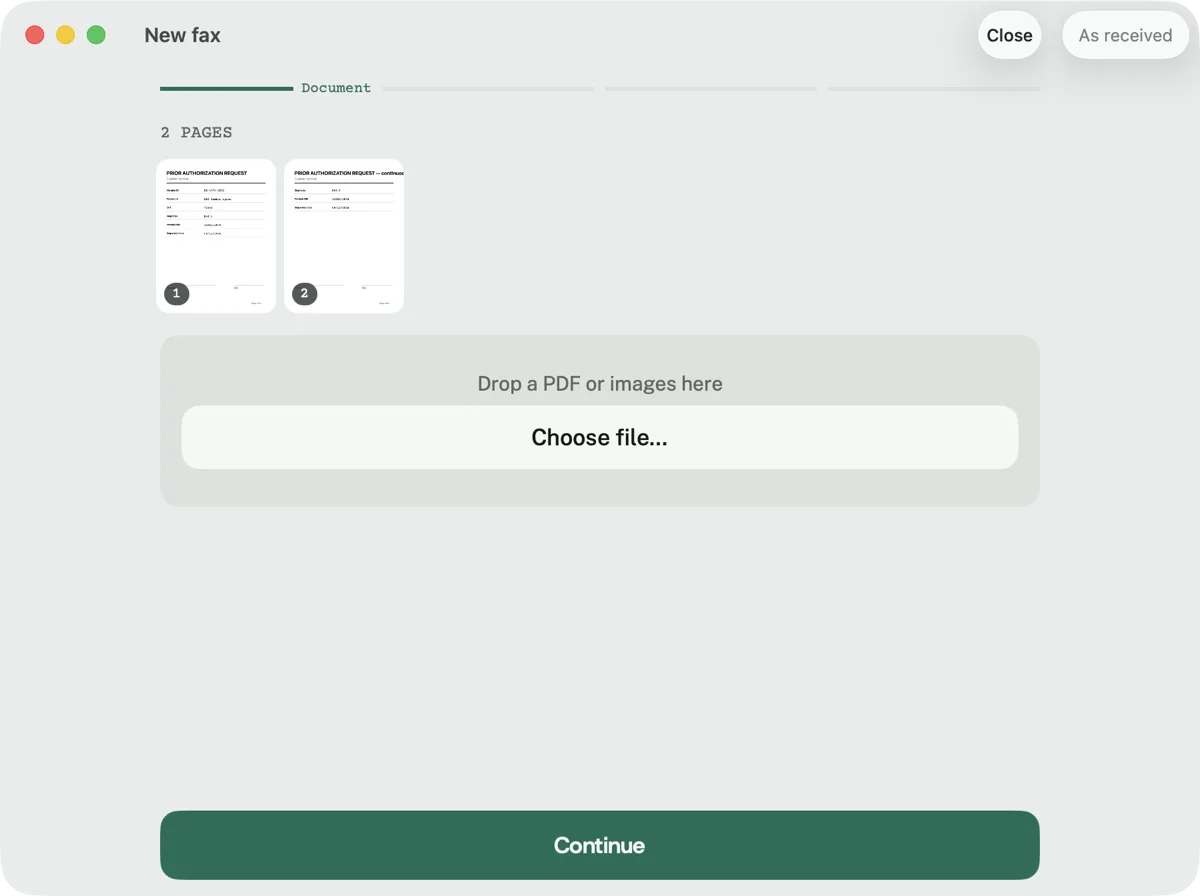
Drop a PDF on the window
Drag the file from Finder, the Desktop or a Mail attachment onto the drop zone, or press ⌘O and choose it. Faxvio takes PDFs and images, counts the pages as they land, and lets you add more before you continue. A fax can carry up to 50 pages.
Check the pages As received
A fax machine prints one bit per dot: grey becomes black or white. The As received view shows each page that way on the Mac’s large screen, which is where a light signature or a coloured stamp shows up while it can still be fixed.
Faxing from any app: Print, then Save as PDF
Faxvio does not appear as a printer in the Print dialog, so a document from Word, Pages or a web page goes through a PDF first. It takes two steps and works in every Mac app that prints.
- In the app, choose File > Print.
- Open the PDF menu at the bottom of the dialog and choose Save as PDF.
- Save the file to the Desktop.
- Drop it on the Faxvio window.
Mac fax apps compared: one 3-page fax, 3 November 2026
Which fax app for Mac fits depends on one question: do you need to receive? To send a form now and then with no account, the per-page apps are the short list, Faxvio and Snapfax. For up to 20 faxes a month on an Intel Mac, Simplefax’s one-time price makes sense. To receive, you need a service that rents you a number: iFax, Fax.Plus or Municorn’s app.
| App | Label on the Mac | Requires | How you pay | One 3-page US fax | Receives | On iPhone |
|---|---|---|---|---|---|---|
 Faxvio | None: one listing, built for the Mac | macOS 14.0 or later and a Mac with Apple M1 chip or later | Page packs that never expire3 pages $1.09 · 7 pages $1.99 · 23 pages $4.99 · 57 pages $9.99 | $1.09the 3-page pack; the cover page is free | No, sends only | Yes, one listing for iPhone, iPad and Mac |
 Snapfax (Mac) | “Only for Mac” | macOS 10.15 or later | Fax credits, 1 credit a page to the US4 credits $1.99 · 20 $7.99 · 60 $19.99 · 200 $49.99 · 1000 $199.99 | $1.99the smallest pack, 4 credits; 1 credit left over | Not on the listing | A separate iPhone and iPad listing |
 WiseFax | “Only for Mac” | macOS 12.4 or later | Fax tokens; the app works out the tokens for each faxFax Token $0.99 · 2 Fax Tokens $1.99 · 3 Fax Tokens $2.99 … 10 Fax Tokens $9.99 | —priced by the app before sending, by pages and destination | Not on the listing | Mac listing |
 Simplefax | “Only for Mac” | macOS 13.0 or later | One purchase; up to 20 faxes a month of up to 20 pages$9.99 once | $9.99the app itself; then no charge within 20 faxes a month | Not on the listing | The vendor also lists iPhone and iPad |
 iFax (Mac) | “Only for Mac” | macOS 12.0 or later | Single faxes, subscriptions and fax numbersoutbound fax $0.99 · $1.99 · outbound subscription $4.99 · $24.99 · Basic Monthly $24.99 · Plus Annual $169.99 · Fax Number $17.99 · Unlimited Fax Number $17.99 · 84 Credits $2.99 | —the listing does not say how many pages an item covers | Yes | A separate iPhone listing |
 FAX from iPhone (Municorn) | “Designed for iPad” | macOS 12.0 or later and a Mac with Apple M1 chip or later | Subscriptions, including one-week plansUnlimited Faxes (1 week) $3.99 · $5.99 · $7.99; other plans up to $29.99 | $3.99the cheapest one-week item on the listing | Yes | The iPad app, run on the Mac |
 Fax.Plus | “Designed for iPad. Not verified for macOS.” | macOS 13.0 or later and a Mac with Apple M1 chip or later | An account and a plan; a free plan to startApp Store: Basic Monthly $8.99 · Basic Annual $83.99 · Premium Monthly $17.99 | —a plan: $6.99 a month billed yearly ($83.99) on fax.plus, 200 pages a month | Yes | The same account |
The label Apple prints matters more on a Mac than on a phone. “Designed for iPad” means the iPad app runs on the Mac unchanged, with touch-sized controls and the iPad’s layout; Fax.Plus adds “Not verified for macOS”. “Only for Mac” means a separate listing, and usually a second purchase for the phone. Faxvio carries no label: one listing, built for the Mac window, the same purchase on iPhone and iPad. Every iPhone fax app with prices is compared in all iPhone fax apps compared.
Is there a free fax app for Mac?
Not one that sends without limits, because every page of a fax travels over a paid phone line. What exists are free starts with conditions. FaxZero is a website, not an app: up to 3 pages plus a cover for free, to the US and Canada, with FaxZero’s branding on the cover. Fax.Plus gives 10 free pages in total, once, after you open an account and verify a mobile number. Snapfax’s Mac listing offers one free fax credit for a trial.
Faxvio’s browser version puts your first page on your balance once, when you first sign in on the web, so a one-page fax to an ordinary number costs nothing. In the Mac app, pages come from a pack or from your iPhone through iCloud Keychain. Every way to send from a Mac without an app, step by step, is in every way to fax from a Mac.
One purchase on iPhone, iPad and Mac
Faxvio is one App Store listing for all three. Buy it on the iPhone and it is on the Mac too; buy a pack and where the pages live depends on one setting, iCloud Keychain.
With it on, scan a page with the iPhone camera, send it from the Mac, and History shows both. A fax sent from the other device shows its details but no page thumbnails: the pages are not copied between devices.
| iCloud Keychain | Your pages |
|---|---|
| On | One balance on your iPhone, iPad and Mac. |
| Off | Each device keeps the pages bought on it. |
“Your iPhone’s pages appear here when iCloud Keychain is on.”Faxvio on a new Mac
“Nothing to restore — pages live on the device they were bought on. Turn on iCloud Keychain to share them.”Faxvio, Restore Purchases with iCloud Keychain off
66 s
median, from Send to Delivered
35 s
a page on average (median 29 s)
79 %
of delivered faxes in under 2 minutes
From a PDF to Delivered in six steps
- Add the document. Drop it on the window or press ⌘O.
- Type the number. Choose the country; Faxvio adds the code and flags toll-free numbers that use 2 pages per page.
- Add the cover page. To, From, subject and a note, never charged.
- Check As received. Fix a faint page now, not after.
- Confirm and send. The pages, the cost and your balance after, then Send fax.
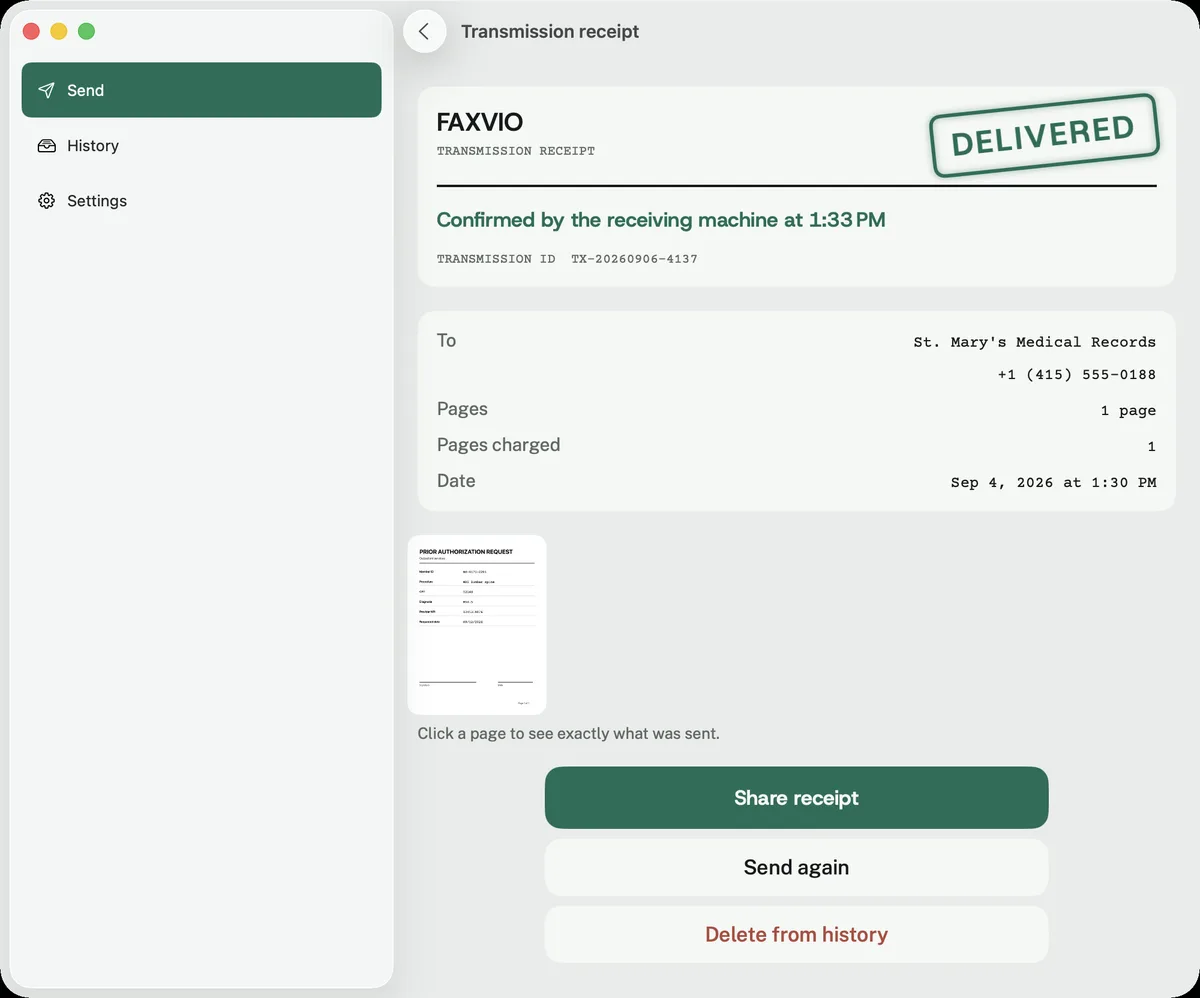
- Keep the receipt. Delivered, confirmed by the receiving machine; ⌘⇧S shares the PDF.
The receipt lists the time the receiving machine confirmed, the number, the pages and a transmission ID; the PDF receipt is explained field by field.
Get it on the App Store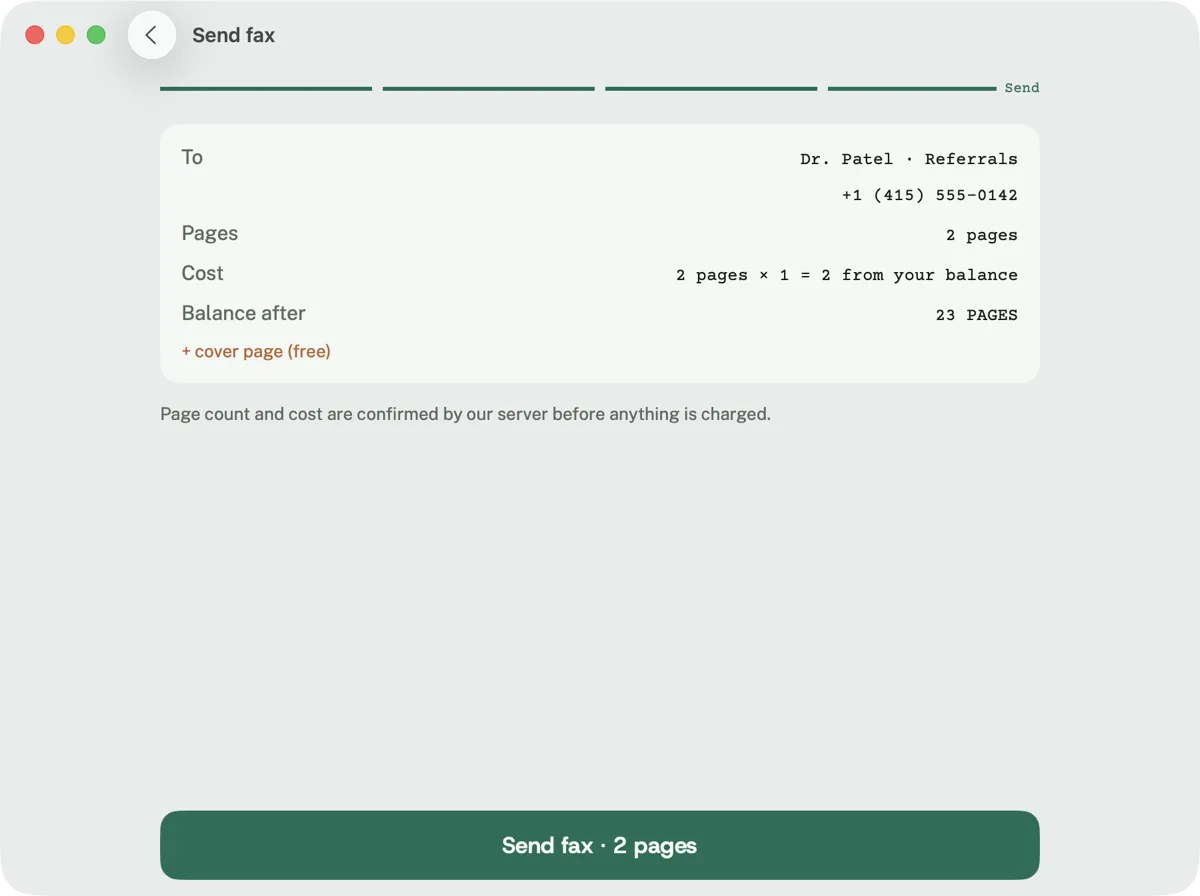
What you need
Requires macOS 14.0 or later and a Mac with Apple M1 chip or later. That covers every MacBook Air, MacBook Pro, iMac, Mac mini, Mac Studio and Mac Pro with Apple silicon. Intel Macs cannot run the app; on one, send from the browser on this page instead.
The window can be resized down to 900 by 640 points, the sidebar hides with ⌃⌘S, and every command is in the menu bar. You need an internet connection and the recipient’s fax number; Faxvio sends to 37 countries at one price per page, listed with their dialling rules on the destinations page.
| Shortcut | What it does |
|---|---|
| ⌘N | New Fax |
| ⌘O | Open File… |
| ⌘1 | Send |
| ⌘2 | History |
| ⌘3 | Settings |
| ⌘⇧S | Share Receipt |
| ⌃⌘S | Hide or show the sidebar (View menu) |
Can macOS fax by itself?
Only through a fax printer. Apple’s Mac User Guide documents faxing from a Mac with a multifunction printer that supports faxing: open the document, then choose File > Print. Click the Printer pop-up menu, then choose your multifunction printer under Faxes. That printer has to be plugged into a phone line. Without one, the Mac needs an app or a website to reach a fax machine.
What Faxvio for Mac does not do
- It does not receive faxes and gives you no fax number, so there is nothing to rent.
- It does not run on Intel Macs; the browser version does, on a Mac, a Windows PC or an Android phone.
- It is not a printer in the Print dialog: save as PDF, then drop the file.
- It does not sell plans. Four page packs, 3 for $1.09, 7 for $1.99, 23 for $4.99, 57 for $9.99, are the whole price list.
- It does not promise delivery. Delivered appears only when the receiving machine confirms; a fax that cannot get through returns its pages.
Your document travels encrypted to our server and the fax carrier and is removed from our server as soon as the carrier accepts the fax.
Questions about faxing from a Mac
What is the best fax app for Mac?
It depends on whether you need to receive. For sending without a subscription, the apps that price per page or per fax are the short list: Faxvio at $1.09 for a 3-page fax, Snapfax from $1.99, and Simplefax at $9.99 once for up to 20 faxes a month. To receive faxes you need a service with a fax number, such as iFax or Fax.Plus.
Does Apple have a built-in fax app?
No. macOS has no fax app. Apple’s Mac User Guide documents one route: if a multifunction printer that supports faxing is connected to your Mac and to a phone line, you choose File > Print and pick that printer under Faxes. Without such a printer, you need an app or a website.
Can I fax from my Mac for free?
With conditions. FaxZero’s website sends up to 3 pages plus a cover for free, to the US and Canada, with its branding on the cover page. Fax.Plus has a free plan with 10 pages in total, once, after you open an account and verify a mobile number. In Faxvio’s browser version your first page is free once, when you first sign in on the web. No Mac app in the table sends without limits.
Can I use my Mac as a fax machine?
For sending, yes: Faxvio turns a PDF on your Mac into a fax and reports when the receiving machine has confirmed it. It does not answer a phone line or receive faxes, so it does not replace a fax machine for incoming documents.
Is Faxvio a real Mac app or an iPad app?
A Mac app. The App Store shows no “Designed for iPad” label on Faxvio: on a Mac it has a sidebar, a drop zone for PDFs and images, menu-bar commands, keyboard shortcuts and a resizable window. It is the same listing and the same purchase as on iPhone and iPad.
Will the pages I bought on my iPhone work on my Mac?
Yes, with iCloud Keychain turned on: then your iPhone, iPad and Mac share one balance. With it off, each device keeps the pages bought on it; the app says “Nothing to restore — pages live on the device they were bought on. Turn on iCloud Keychain to share them.”
Does Faxvio work on an Intel Mac?
The app does not: it needs a Mac with Apple M1 chip or later and macOS 14 or later. On an Intel Mac, send from the browser instead: the form on this page works in Safari, Chrome or Firefox on any Mac.
Can I fax a Word or Pages document from a Mac?
Yes, as a PDF. In Word or Pages choose File > Print, open the PDF menu and choose Save as PDF, then drop that file on the Faxvio window. Faxvio sends PDFs and images; it does not open .docx or .pages files directly, and it does not appear as a printer in the Print dialog.
How long does a fax from a Mac take?
About a minute. The Mac sends through the same service as the iPhone: on real Faxvio sends from September to November 2026, the median from Send to Delivered was 66 seconds and 79 % arrived in under two minutes. The receiving machine and its line set the pace.
Can Faxvio receive faxes on a Mac?
No. Faxvio sends faxes only and gives you no fax number. If you need to receive, choose a service in the table that rents you a number.
More for Mac users
- Every way to fax from a Mac, step by stepThe fax printer, websites and apps, each priced.
- How to fax from a computerWindows, Mac and Chromebook in the browser.
- Faxvio for iPhone and iPadThe same purchase, with the document camera.
- Fax previewSee a page at fax resolution before you send it.
- Fax transmission timeHow long any fax takes, page by page.
- Page packs and pricesWhat a typical fax costs, after the first page.
Bottom line
Faxvio for Mac is fax software you pay for per page: drop a PDF on the window, type the number and send, $1.09 for 3 pages and down to $0.18 a page, with no subscription and no account. On real sends a fax reached Delivered in a median 66 seconds, with a PDF receipt the receiving machine confirmed. It is the same purchase as on iPhone and iPad, needs Apple silicon and macOS 14, sends to 37 countries and does not receive.