
How can we help?
Faxvio sends faxes from your browser to 37 countries and charges per page, from $0.18. It only sends. Your first page is free, a fax that does not arrive gives its pages back, and every delivered fax has a PDF receipt. Short answers to everything else are below.
Sending a fax
How do I send a fax from my browser?
Drop a PDF or a photo into the form, type the fax number as it is printed and press Send. You sign in only at that moment, with Google, Apple or a 6-digit code sent to your email, and there is no password to make up. It works in any current browser on Windows, Mac, ChromeOS, iPhone or Android, with nothing to install.
- Drop a PDF or a photo into the form.
- Type the fax number as it is printed.
- Check the price on the button and press Send.
What files can I send, and how big can they be?
PDFs and photos: PDF, JPEG and PNG, and iPhone HEIC photos, which your browser converts before sending. One fax can carry up to 50 pages and 19 MB of files, and you can add several files in the order they should arrive. Every page is shown in black and white before you send, the way the receiving machine will print it, so a faint stamp or a pale signature shows up while you can still fix it.
Preview a page in black and whiteCan I add a cover page?
Yes. Leave “Cover page” ticked and Faxvio puts one in front of your pages with the name you type in the From field. It is never charged. If you want a cover sheet with a subject line and a note, make one with the free cover sheet tool and add it as the first file; it then travels as an ordinary page of the fax.
Make a cover sheetWhy does a fax to the US ask for my name?
US rules ask every fax to name its sender, in the margin of each page or on the first page. For any +1 number, in the US, Canada and the nearby territories, Faxvio therefore asks for your name in the From field and adds the cover page that carries it. The cover page is never charged, and the name is printed only on that page.
Is there a limit on how many faxes I can send?
Yes: up to 10 faxes an hour and 60 a day per account, and a new account sends up to 20 pages in its first day. The limits keep the fax lines free of bulk and advertising faxes, which are against the terms. Ordinary use never comes near them.
Can I cancel a fax after pressing Send?
Yes, until the call starts. While the form says Sending, press “Cancel this fax”: nothing is dialled and the pages come back to your balance. Once the status says On the line, the receiving machine is already taking the pages and the fax can no longer be stopped.
Delivery and receipts
How long does a fax take?
About a minute. On real Faxvio sends from September to November 2026 the median time from Send to Delivered was 66 seconds, a page took 35 seconds on average, and 79 % of faxes were delivered in under two minutes. Long faxes and slow machines take longer. You can close the page: tick “Email me the result” and the outcome comes by email.
Estimate your faxWhat does “Delivered” mean?
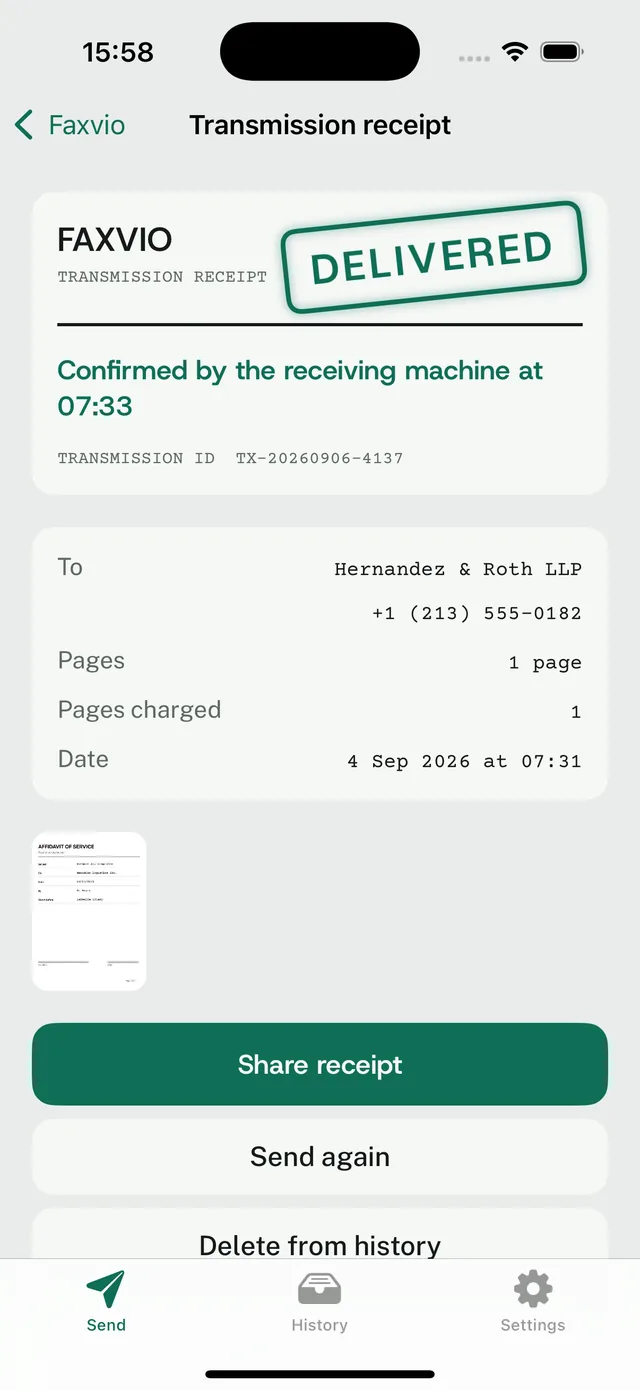
That the receiving fax machine confirmed the pages. Faxvio shows Delivered only then, never earlier and never as a guess. Before that the status reads Sending, while the carrier dials, and On the line, while the other machine takes the pages. A fax that cannot be completed reads Not delivered and returns its pages.
| Sending | The carrier is dialling. You can still cancel. |
|---|---|
| On the line | The receiving machine is taking the pages. |
| Delivered | The receiving machine confirmed the pages. The receipt is ready. |
| Not delivered | The fax could not be completed. The pages are back on your balance. |
| Cancelled | Stopped before the call. Nothing was dialled; the pages are back. |
My fax was not delivered. What now?
The pages are already back on your balance. Open the fax in your account to see why: the line stayed busy, no fax machine answered, the line failed part-way, the number could not be dialled, it answered as a voice line, or the document could not be converted. Check the number, then press Try again; the number is filled in for you.
- Open the fax in your account.
- Read the reason under its status.
- Check the number, add the file again and press Try again.
Where is my receipt?
In your account: open the fax and press Download receipt. The PDF shows the date and time, the fax number, the pages and the transmission ID, and it is issued once the receiving machine has confirmed the fax. If you ticked “Email me the result”, the email links straight to the same fax.
- Open your account.
- Choose the fax in the Sent list.
- Press Download receipt.
Can Faxvio receive faxes?
No. Faxvio only sends. It gives you no fax number of your own, so there is nothing to receive with and nothing to rent. If someone needs to fax you back, give them an email address or a number from a service that receives.
What number does the recipient see?
The header line printed across the top of every received page is stamped by the carrier: the date, the time, the page number and Faxvio’s sending line. It is not your number and it does not take calls or faxes back. Your name reaches the recipient on the cover page.
Pages and payment
Is the first page really free?
Yes, once. When you first sign in on the web, one page goes onto your balance: one per email address and one per browser. It is an ordinary page of balance, so a one-page fax to an ordinary number then costs nothing, and on a longer fax it pays for one of the pages. A toll-free or premium number uses 2 pages per page, so there the free page covers half of the first page and the form asks for the rest.
What do pages cost?
$1.09 for 3 pages, $1.99 for 7 pages, $4.99 for 23 pages, $9.99 for 57 pages: $0.18 to $0.36 a page. There is no subscription, each pack is one payment, and pages you do not use never expire. On the web you pay by card, Apple Pay or Google Pay on a secure payment page, only when a fax needs more pages than you have.
See pricingWhy did my fax use 2 pages per page?
The number was toll-free or premium, such as an 800, 855 or 877 number in the US. The carrier charges more to reach them, so each page uses 2 pages of your balance, and the free first page covers half of one. The form shows this as soon as you type the number, before you sign in or pay.
Check a numberHow do I get a refund?
Pages for a fax that was not delivered come back on their own, with no request. A refund of the money for a pack goes through whoever took the payment. For a purchase on the web, write to support from the email you paid with and name the pack and the date. For a purchase in the iPhone or Mac app, Apple handles it at reportaproblem.apple.com. When a pack is refunded its pages leave the balance; the terms have the details.
Read the termsAccount and sign-in
I did not get the sign-in code
Look in spam and promotions first. You can ask for a new code on the same screen; each code works for 10 minutes. The email also carries a sign-in button, so you can sign in without typing the code. Your fax waits in the browser meanwhile.
- Look in spam and promotions.
- Ask for a new code on the same screen.
- Or press the sign-in button in the email itself.
Do I need an account or a password?
You need to sign in to send, and only then: with Google, with Apple, or with a code sent to your email. There is no password. Signing in gives your pages, receipts and results a home. Everything before Send, the files, the preview, the number check and the price, works without signing in.
Can I use my pages in the iPhone or Mac app?
Not yet. The web and the app sell the same four packs at the same prices, but for now each keeps its own balance: pages bought on the web stay on your web account. One balance for both comes with a later update of the app.
Faxvio for iPhoneHow do I delete my account?
Open your account and go to Settings at the bottom, then press Delete account and type DELETE to confirm. It removes your email, your Google and Apple sign-ins and every session. Unused pages on the account cannot be used afterwards, so the confirmation says how many there are.
Open account settingsCountries and numbers
Which countries can I fax?
37, at the same price per page, including the US, Canada, the UK, Germany, France, Japan and Australia. A number outside the list is refused as you type it, before anything is charged. Toll-free and premium numbers use 2 pages per page in every country.
See all 37How do I type a number from abroad?
Pick the country and type the number as it is printed, leading 0 included. Faxvio adds the country code and drops the 0 where the country needs it, and keeps it in Italy and Vatican City, where it belongs to the number. A number pasted with + or 00 is read as international.
Check a numberCan I fax an extension?
No. A fax service dials the number itself and cannot key in an extension once the call is answered. Ask the office for its direct fax line; most print it on the letterhead or the form beside the phone number.
Privacy and your document
Where is my document after I send it?
Not on our server. The file stays in your browser until you press Send, travels encrypted to our server and the fax carrier, and is removed from our server as soon as the carrier accepts the fax, and never kept longer than 24 hours. Your receipt and the record of the fax stay in your account.
Privacy policyDoes anyone at Faxvio read my fax?
No. We never open, read, index or analyse the content of a document, and nothing about its pages is written to a log. Our records hold that a fax happened, not what it said.
Privacy policyWhat does Faxvio keep about me?
Your sign-in email; for each fax the number, the page count, the status and the transmission ID, for 90 days; and your balance with the purchases that made it. File names you see in your account are kept in your own browser, not on our server.
Privacy policyNothing matches. Try another word, or pick a topic above.
Faxvio at a glance
The facts every answer above rests on, in one place. They are the same on every page of this site and in the app.
| What it does | Sends faxes, only sends From a web browser, an iPhone, an iPad or a Mac. No receiving and no fax number of your own. |
|---|---|
| Price | Per page, $0.18–$0.36 Four packs, $1.09 for 3 pages to $9.99 for 57. No subscription; pages never expire. |
| Countries | 37, one price per page Toll-free and premium numbers use 2 pages per page, shown before you pay. |
| First page | Free, once On your first sign-in on the web: one per email and one per browser. |
| If a fax fails | Pages come back Automatically, to your balance, with the reason. |
| Your document | Deleted after hand-off Removed from our server as soon as the carrier accepts the fax; never kept longer than 24 hours. |
| Proof | PDF receipt Delivered only once the receiving machine confirms; the receipt has the time, number, pages and transmission ID. |
| Signing in | Email code, Google or Apple Only when you press Send. No password. |
| Web and app | Same packs, own balances One balance for the web and the app comes with a later app update. |
| Refunds | Failed fax: automatic Money for a pack: through whoever took the payment, the web’s payment page or Apple. |
What happens after you press Send?
Your file stays in your browser while you set the fax up: the page count, the black-and-white preview and the price are worked out on your computer. Pressing Send signs you in if needed, uploads the file over an encrypted connection and hands it to the fax carrier, which dials the number. As soon as the carrier accepts the fax, our copy of the document is deleted. The answer comes from the machine at the other end.
The limits, in numbers
A few numbers decide what one fax and one account can do. They are set on the server and the form reads them, so the form refuses a file or a fax that would break one before you pay for anything.
| Pages in one fax | 50 |
|---|---|
| Files in one fax, in total | 19 MB |
| Faxes an hour, per account | 10 |
| Faxes a day, per account | 60 |
| Pages on a new account’s first day | 20 |
| A sign-in code works for | 10 min |
| A price stays valid for | 30 min |
| Fax records kept | 90 days |
A price older than 30 minutes is simply checked again before sending. For the reasoning behind each limit, and everything you agree to, read the terms; for what is stored and why, the privacy policy.
Bottom line
Faxvio sends faxes from a browser, an iPhone, an iPad or a Mac to 37 countries and does not receive them. A page costs $0.18 to $0.36 in four packs with no subscription; your first page on the web is free, once per email and once per browser. Delivered means the receiving machine confirmed, and each delivered fax has a PDF receipt; a fax that is not delivered returns its pages. Your document is deleted from our server as soon as the carrier accepts it. You sign in with an email code, Google or Apple, only when you send. Still stuck? See how to contact Faxvio.
Your first page is on us.