
Send a fax from your iPhone. Pay per page.
Scan the pages, type the number, tap send. A page costs $0.18 to $0.36, pages never expire, and every delivered fax comes back with a receipt the receiving machine confirmed. No account. No weekly plan.
- Your first page is on us
- Pages never expire
- Failed pages refunded
11-OCT-2026 · FROM: YOUR IPHONE · P.1/2
To +1 (415) 555-0188 · 2 pages + cover
Confirmed by the receiving machine · TX-20260906-4137
Confirmed by the receiving machine at 07:42
Transmission ID TX-20260904-4137
- To
- St. Mary’s Medical Records
+1 (415) 555-0188 - Pages
- 1 page + cover page (free)
- Pages charged
- 1
- Date
- 4 Sep 2026 at 07:39
What do you get when a fax is delivered?
You get a transmission receipt: a PDF with the date, the destination number, the page count, the pages charged and a transmission ID, stamped DELIVERED once the receiving machine has acknowledged every page. Faxvio writes the receipt on your device from the carrier’s delivery report, so it exists even after you delete the fax, and it can be shared, printed or saved to Files like any other document.
The receipt is the point of faxing. A fax has exactly one advantage over email, and it is that the receiving machine talks back. Under the ITU-T T.30 procedure every fax machine follows, the receiver sends a confirmation signal after each page it has decoded, and a transmission is not complete until the last of those confirmations arrives. When a tax office, a court clerk or an insurer asks for “proof it was sent”, that confirmation, with a timestamp and the number it went to, is what they mean.
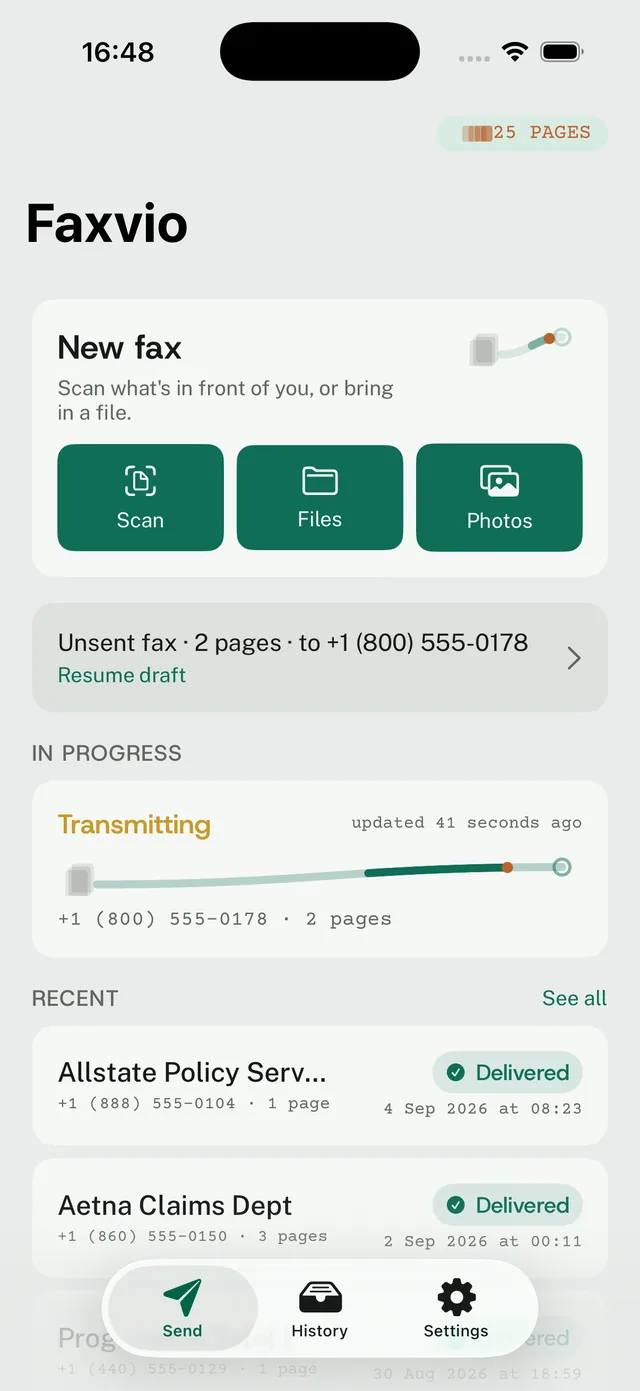
Faxvio shows Delivered only when the carrier reports that confirmation. Before it, the status is Transmitting, with the time of the last update; if the confirmation never comes, the status is Could not be delivered — pages returned, and the pages go back to your balance without you asking. The app never shows Delivered on optimism, and it never charges for a fax that did not land.
Receipts, history, the cover page and the monochrome “as received” preview are free and unlimited. Only transmission costs pages.
How much does it cost to send a fax with Faxvio?
A page costs between $0.18 and $0.36, depending on the pack. The smallest pack is 3 pages for $1.09 and the largest is 57 pages for $9.99, at US App Store prices. There is no subscription, no monthly minimum and no expiry: a pack bought today is still there whenever the next fax comes along, which for most people is months away.
- 3 pages $1.09 $0.36 per page Send this fax
- Preselected 7 pages $1.99 $0.28 per page A few forms
- 23 pages $4.99 $0.22 per page Best value
- 57 pages $9.99 $0.18 per page The office drawer
The two apps with the most ratings in the App Store’s fax category sell only subscriptions: weekly, monthly or annual, with no per-fax price at all. Their reviews have carried the same request for years, “let me pay a dollar for the one fax I send every two years”, and that request is the product. A 3-page fax, the typical size of a form with a cover, costs $1.09 on Faxvio, and the two pages you did not use wait for the next one.
Two pay-per-page apps exist in the US store, and Faxvio is cheaper than both on the entry pack and on every larger pack: $0.36 per page against $0.50 on the smallest Snapfax pack and $0.99 on a single Genius Fax credit, down to $0.18 per page on the 57-page pack. The pricing page shows the full arithmetic and what a fax costs page by page.
| Fax | Pack to buy | You pay | Pages left over |
|---|---|---|---|
| 1 page (your first is free) | 3 pages | $1.09 | 2 |
| 3 pages | 3 pages | $1.09 | 0 |
| 7 pages | 7 pages | $1.99 | 0 |
| 23 pages | 23 pages | $4.99 | 0 |
A cover page is always free and is never counted. Toll-free, shared-cost and premium numbers use 2 pages per page; the app says so before you confirm.
Transmission log · four entries
How does faxing from a phone work?
Scan, or bring the pages in
The document camera finds the page edges and flattens the shot. Or open a PDF from Files, a photo from Photos, or share anything into Faxvio from another app. Reorder pages, drop the blank ones, add a free cover sheet with your name and a note.
Type the number, see the price
Pick the country by dial code, type the number, or choose it from Contacts. The app quotes the fax before you send: how many pages it will use, and whether the number is a toll-free or service prefix that costs two per page.
Check the pages as the receiver will see them
Every page is shown in monochrome at fax resolution before anything is transmitted, because a grey signature that looks fine on a phone can arrive as a smudge. What you see is what the machine at the other end prints.
Send, and keep the receipt
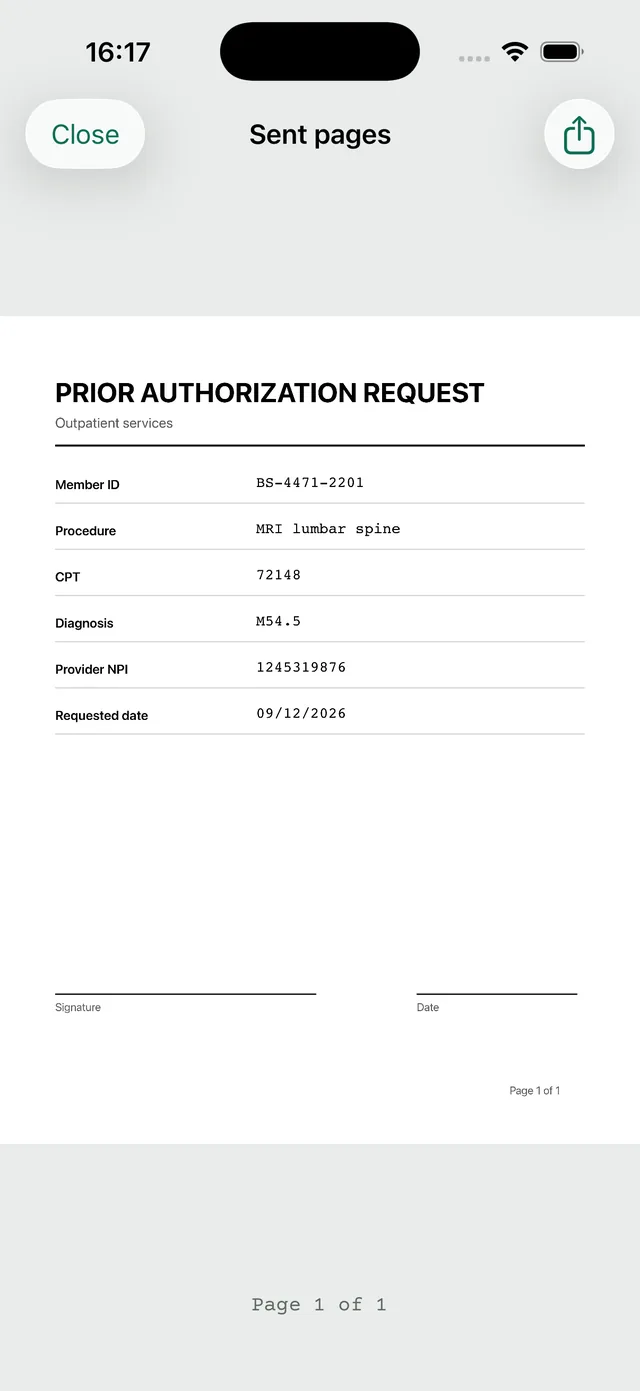
The lane shows the transmission in flight. When the receiving machine confirms, the app notifies you once, stamps the receipt DELIVERED and files it in History with the sent pages. If it fails, the pages come back.
Which countries can Faxvio send a fax to?
37 countries and territories as of 2026-09-06. This is the app’s own allow-list, read from its server when this page was built: a number outside it is refused before a page is charged, so the list here and the list in the app cannot differ.
Numbers marked ² have toll-free, shared-cost or premium prefixes that use 2 pages per page. Every rule, per country →
North America
- Canada+1
- Puerto Rico+1
- U.S. Virgin Islands+1
- United States+1
Europe
- Austria+43
- Belgium+32
- Denmark+45
- Finland+358
- France+33
- Germany+49
- Greece+30
- Ireland+353
- Italy+39
- Jersey+44
- Luxembourg+352
- Netherlands+31
- Norway+47
- Portugal+351
- Romania+40
- Spain+34
- Sweden+46
- Switzerland+41
- United Kingdom+44
- Vatican City+39
Asia–Pacific
- Australia+61
- China+86
- Hong Kong SAR China+852
- India+91
- Indonesia+62
- Japan+81
- South Korea+82
Latin America
- Argentina+54
- Brazil+55
- Chile+56
Middle East & Africa
- Israel+972
- Saudi Arabia+966
- South Africa+27
What Faxvio does not do
A fax app earns trust by being precise about its limits, so here they are, in the same words the app uses.
- It does not receive. Faxvio has no inbound number and cannot take a fax on your behalf. It sends.
- It does not promise delivery. Fax is a phone call between two machines, and the machine at the other end can be busy, out of paper or switched off. Faxvio retries, reports the state the carrier reports, and returns the pages when a fax cannot be delivered. It does not say “delivered” until the receiver has confirmed.
- It does not sell subscriptions. Four page packs, bought through the App Store, is the entire price list. There is nothing to cancel because there is nothing recurring.
- It does not keep your document. Your pages travel through Faxvio’s service and its fax carrier to reach the receiving machine, encrypted in transit, and are deleted from the server after transmission. Receipts are built on your device. There is no account and no name attached to any of it.
- It makes no regulatory compliance claims. If your organisation requires a signed agreement with its fax provider, Faxvio is not that provider, and no wording on this site should be read as saying otherwise.
- It does not send bulk or unsolicited fax. There are rate limits per account, and advertising faxes are against the terms; the app is for the fax you have to send, not a campaign.
Everything else in the app — scanning, assembling, previewing, the cover page, Contacts, History and receipts — works without a balance, offline, and before you have bought anything.
Free tools · in the browser · nothing uploaded
Need something before you send?
- Open →
Fax cover sheet generator
Fill in To, From, subject and page count, print it or save it as a PDF. Plain, medical and legal layouts.
- Open →
Fax cost calculator
Pages and destination in, the exact Faxvio price out, next to what the same fax costs on a subscription or at a print shop.
- Open →
International fax number formatter
Turns a number as it is printed on a letterhead into the +country form the network dials, and flags prefixes that cost double.
- Open →
Fax preview
Drop in a photo of a page and see it as the receiving machine will print it: one-bit black and white at fax resolution.
- Open →
Fax transmission time calculator
How long a fax of N pages takes at standard or fine resolution, and why a VoIP line is slower than the number on the modem.
Questions people ask before their first fax
How much does it cost to send a fax with Faxvio?
Between $0.18 and $0.36 per page, depending on the pack you buy: 3 pages for $1.09, 7 for $1.99, 23 for $4.99 or 57 for $9.99 (US App Store prices; Apple sets the local equivalent elsewhere). A cover page is free. Numbers on toll-free, shared-cost or premium prefixes count as 2 pages per page, and the app tells you before you send.
Do I need an account or a subscription?
No. There is no sign-up, no email address and no subscription. Pages are bought as one-off packs through the App Store and stay in your balance until you use them. Your balance follows your Apple devices through iCloud Keychain, so the same pages are available on your iPhone, iPad and Mac.
Do the pages I buy expire?
No. Pages never expire. Buy 23 pages today, send one fax a year, and the balance is still there in 2030.
What happens if a fax fails?
The pages come back to your balance automatically. Faxvio only keeps pages for transmissions the receiving machine confirmed. A busy line, a wrong number, a machine that hangs up — all of these return the pages, and the app tells you so.
What does “Delivered” actually mean?
That the receiving fax machine acknowledged every page. Under the T.30 procedure all fax machines follow, the receiver confirms each page after decoding it; Faxvio shows Delivered only when the carrier reports that confirmation. Until then the status is Transmitting, and if the confirmation never comes, the status is “Could not be delivered — pages returned”.
Can Faxvio receive faxes?
No. Faxvio sends. It does not give you a fax number and it cannot receive on your behalf. If you need to receive faxes regularly, a fax number subscription from another provider is the right tool; Faxvio is for the fax you have to send today.
Which countries can I fax to?
37 countries and territories, including the United States, Canada, the United Kingdom, Germany, France, Japan, South Korea, Australia and Brazil. The full list is on the destinations page and is the same allow-list the app enforces before charging a page.
Is there a Mac or Android version?
Faxvio runs on iPhone, iPad and Mac from one App Store purchase, with one shared balance. An Android app is planned and not yet available; the Google Play badge on this site says “soon” until it is.
How do I get my first page free?
Install the app and send a one-page fax to a standard number in any supported country. The first page is on us, once per device and once per account; the app shows “your first page is on us” on the send button while it applies.
What can I fax, and how big can it be?
Pages from the document camera, PDFs and images from Files or Photos, and anything shared to Faxvio from another app. A single fax can carry up to 50 pages and 19 MB. You see every page in monochrome, exactly as the receiving machine will print it, before you send.
Bottom line
Faxvio is a fax app for iPhone, iPad and Mac that charges per page instead of per month: $1.09 for 3 pages up to $9.99 for 57, pages that never expire, a free cover page, a monochrome preview of exactly what the receiver will print, automatic refunds for faxes that fail, and a PDF transmission receipt stamped when the receiving machine confirms. It sends to 37 countries, does not receive, needs no account, and keeps no copy of your document after transmission.
Your first page is on us. Then from $0.18 a page.