
How to fax a signed W-9 to a client from your phone
Which page to send, how to sign it on an iPhone, Mac or in Acrobat, what goes on the cover page, and how to show the client it arrived.
 Merey Tleugazin, founder of Faxvio
Updated · 9 min read
Faxing a W-9, in short
To fax a W-9 to a client, sign page 1 of the form on your phone with Markup, then send that one page to the client’s fax number, not to the IRS. From this page one page costs $1.09, or nothing if it is your first page on Faxvio, and the PDF receipt shows when the client’s machine accepted it.
- 1Download the W-9 from irs.gov and fill in page 1.
- 2Sign it in Markup in the Files app or Preview.
- 3Send page 1 only to the fax number the client gave you.
- 4Keep the receipt with the invoice it belongs to.
1 of 6
pages to send: the rest are instructions
$1.09
for up to 3 pages
66 s
to Delivered, median
Send yours from here
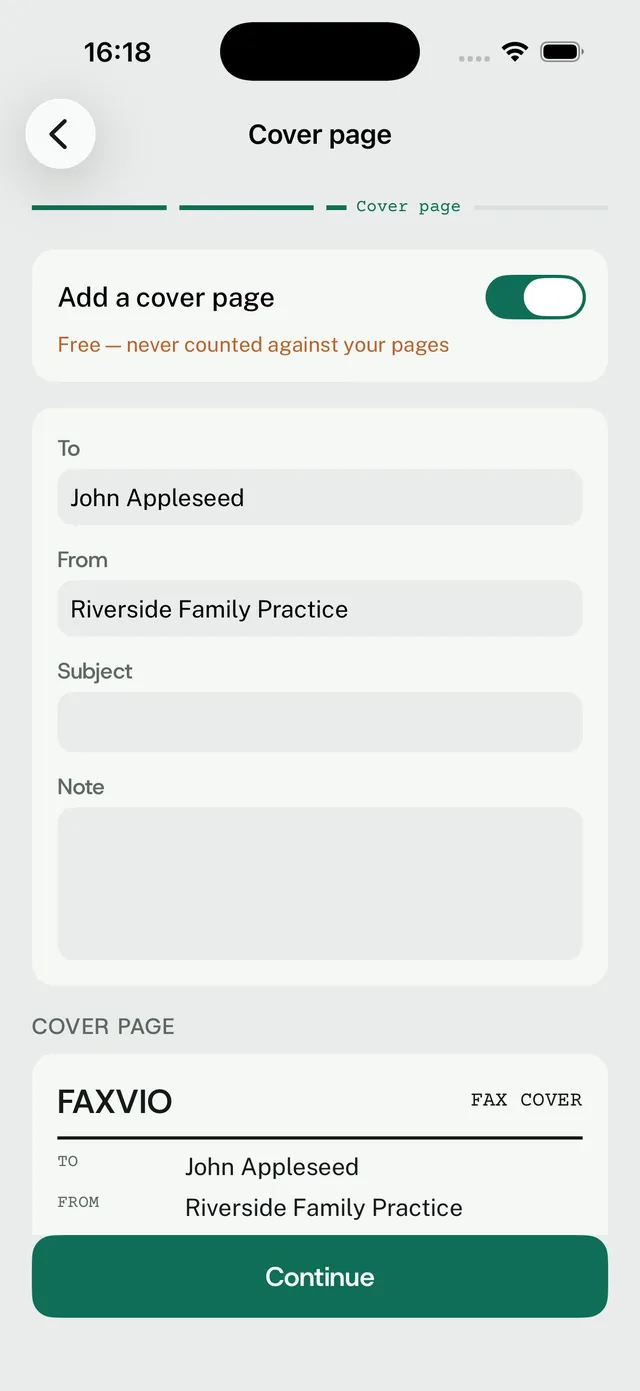
The cover page goes out titled “Form W-9”, a subject you can change in the form, with your name on it. Add the signed page and the client’s fax number.
- Pages
- Number
- Send
Ready to go.
Check your email
We sent a 6-digit code to . Type it here to go on.
By continuing you accept the Terms and Privacy policy.
Pages for this fax
One payment, nothing renews. Card, Apple Pay or Google Pay on the next screen.
Who do you send a W-9 to?
To the person or business that asked for it. Never to the IRS.
A W-9 is a form you give to someone who pays you, so that they can report those payments to the IRS. The IRS describes its purpose in one line: “Use Form W-9 to provide your correct Taxpayer Identification Number (TIN) to the person who is required to file an information return with the IRS”. In practice the requester is a client who pays you as a contractor, a platform that pays you out, a bank opening an account, or a business buying from you. They keep your W-9 on file and use it when they prepare forms such as the 1099-NEC at the end of the year.
That is why the form says, in the top right corner of page 1: “Give form to the requester. Do not send to the IRS.” The IRS does not want your W-9, and has no fax number for it. If you are looking for the numbers the IRS does take faxes on, for an EIN application or a power of attorney, those are on the IRS fax numbers by form page.
Whether your client takes the form by fax is up to them. The IRS’s instructions for requesters say: “Requesters may establish a system for payees and payees’ agents to submit Forms W-9 electronically, including by fax.” Some accounts payable teams list a fax number for vendor paperwork on their onboarding sheet or invoice instructions; others use a vendor portal or email. If they give you a fax number, confirm it with them by phone or from a document you already trust, because page 1 carries your Social Security number or EIN, and a digit off sends it to someone else’s machine.
Which lines of the W-9 do you fill in?
Line 1 is the only line the form marks “An entry is required”: your name, or for a sole proprietor or disregarded entity the owner’s name, with the business name on line 2. Line 3a asks for one tax classification box; the March 2024 revision added line 3b for partnerships, trusts and estates with foreign partners, owners or beneficiaries. Line 4 holds exemption codes that, as the form puts it, “apply only to certain entities, not individuals”.
Lines 5 and 6 are your address, line 7 is optional. Part I takes your Social Security number or EIN; the form asks that it “must match the name given on line 1 to avoid backup withholding”. Part II is the certification, with Sign Here and the date.
Which boxes apply to you is a tax question for you or your accountant; the form’s own instructions on pages 3 to 5 cover each line. This page is about getting the finished page 1 to your client.
How do you sign a W-9 on an iPhone?
With Markup, which is built into the iPhone. Apple’s guide to filling out forms and signing documents starts with the file: “Open the form or document on your iPhone. If prompted, open the document in the Files app, then tap Save.” Tap a blank field to type into it; for a form like the W-9 the fields are already there. Then tap the Markup button and choose Add Signature: “Tap Add Signature, sign your name with your finger, then tap Done.” and “Drag your signature where you want it to appear on the document.” The iPhone keeps your signature for the next form.
Recent versions of iOS also include the Preview app, and Apple has a separate page for filling out and signing PDF forms in Preview on iPhone; the steps are the same idea. When you are done, save the file. That saved PDF is what you add to the fax.
Sign with a dark, steady line. A fax machine prints one bit per dot, black or white, so a thin pale signature can arrive broken up. Before you send, drop the signed page into the fax quality preview to see how it will print on your client’s machine.
| Where | How the maker describes it | Source |
|---|---|---|
| iPhone, Files or Preview | Open the form; tap Markup, then “Tap Add Signature, sign your name with your finger, then tap Done.” | Apple Support |
| Mac, Preview | “To sign PDFs, you can capture your signature using your trackpad, the built-in camera on your Mac, or your iPhone or iPad.” | Apple Support |
| Adobe Acrobat | “Select E-Sign and then select the Fill in form fields icon.” Type into a field or drag a signature or initials from the E-sign panel. | Adobe Help |
How to fax the W-9 from your phone
- 1Open this page on the phone. Safari or Chrome, no app to install. The form is at the top.
- 2Add the signed PDF. Tap the drop area and choose the file from Files. If the PDF has all six pages, that is fine to know before you pay: Faxvio counts them and shows the price, so you can go back and save page 1 on its own.
- 3Type the client’s fax number as printed. Faxvio adds the country code and shows the number it will dial. A number beginning 800, 833, 844, 855, 866, 877, 888, 900 is toll-free or premium and uses 2 pages per page.
- 4Type your name in From. A fax to a US number carries the sender’s name on a cover page; this one is titled “Form W-9” when you send from here.
- 5Send, and wait for Delivered. The median time from Send to Delivered across real Faxvio faxes, September to November 2026, was 66 seconds.
Sending page 1 only saves money and the client’s paper: six pages of a W-9 cost twice what one does, and nobody in accounts payable wants the instructions back. To keep page 1 alone on an iPhone, open the PDF in Preview, show the thumbnails, touch and hold a page and tap Delete Page, as Apple’s guide to adding, deleting and moving PDF pages describes. For the whole iPhone flow, screen by screen, see how to fax from an iPhone.
What should the cover page say?
Who it is for, who it is from, what it is, and what it belongs to. A W-9 often arrives at a shared accounts payable fax with dozens of others, so the most useful line is the note: the invoice number or the contract it goes with, and how the client can reach you. Faxvio prints the date and the page count itself.
Keep your taxpayer identification number off the cover page; it is already on page 1, and a cover page is read by whoever picks it up first. If you want a cover sheet of your own, with your logo or a longer message, make one in the cover sheet tool and put it in front of the form. It then counts as a page, and Faxvio’s cover still goes first to a US number.
What does it cost to fax a W-9?
One page is $1.09 from this page: the smallest pack has 3 pages, and the two you do not use stay on your balance and never expire. That makes the second and third W-9, for the next two clients, free in effect: three one-page faxes come out of the same $1.09 pack. The cover page is never charged.
Your first page is on us, once, the first time you sign in on the web, so the very first W-9 you fax with Faxvio to an ordinary number costs nothing. There is no subscription and no monthly fee, which matters for a form you send a few times a year.
The full W-9, all 6 pages, would use a bigger pack for pages nobody reads. A toll-free client fax number uses 2 pages per page, and the form shows that before you pay. If a fax fails, the pages return to your balance. The pricing page has all four packs.
How do you show the client the W-9 arrived?
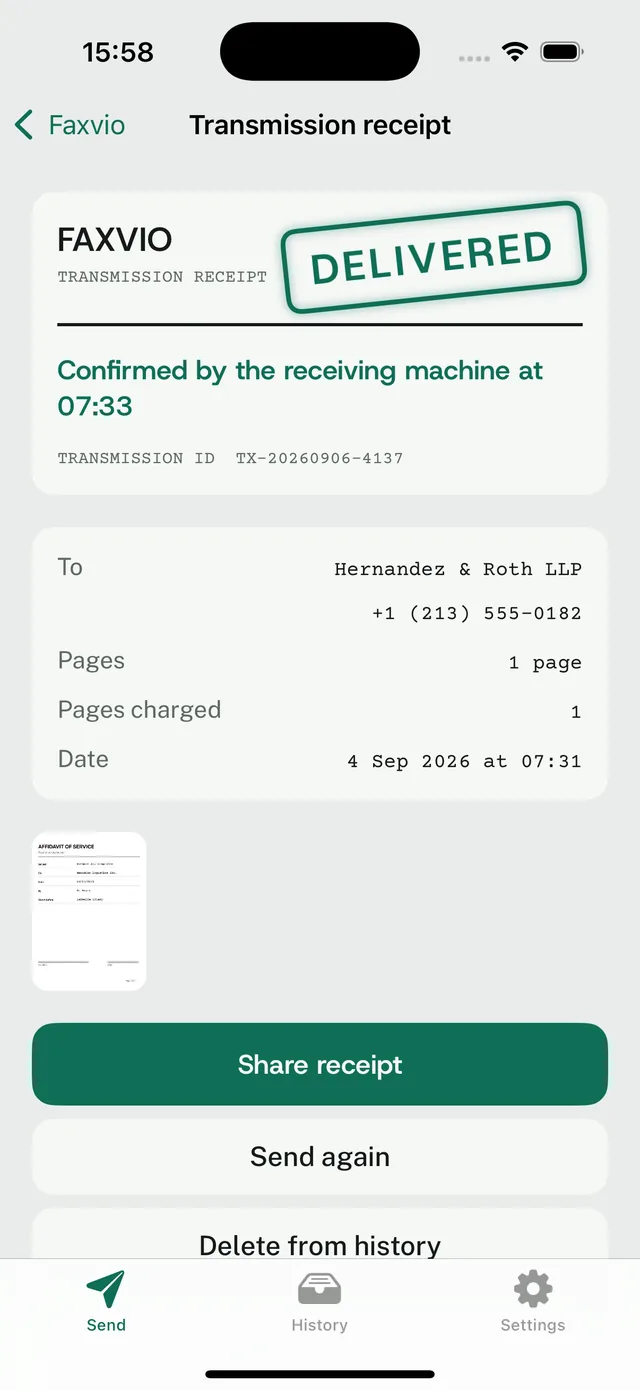
Download the PDF receipt and keep it with the invoice. It shows the client’s fax number in full, the date and time, the pages transmitted, the pages charged, and the moment the receiving machine confirmed the page, stamped Delivered. Faxvio stamps Delivered only when the carrier reports the fax delivered, which happens after the receiving machine has confirmed the pages.
If the client says the form never reached them, send them the receipt: the time and the transmission ID let them search their fax log or fax server, where a W-9 may land in an inbox rather than on paper. The receipt proves the machine at that number accepted the page; it does not show that anyone has filed it, so a short email saying “W-9 faxed today at 2:20 PM” closes the loop. What a fax confirmation proves goes through every field.
If the fax fails, the receipt is stamped Returned with the reason, for example “No answer from the fax machine.”, and the pages go back to your balance. Check the number with the client and send it again.
When a W-9 is the wrong form
A foreign person uses a W-8 instead, the form says.
Form W-9 is for US persons, including resident aliens. Its own text is direct: “If you are a foreign person or the U.S. branch of a foreign bank that has elected to be treated as a U.S. person … do not use Form W-9. Instead, use the appropriate Form W-8 or Form 8233”. If you are not sure which applies, the IRS form pages and your accountant decide that, not the fax.
The sending works the same either way. If your client is abroad, Faxvio sends to 37 countries at one price per page; type the number as it is printed and Faxvio adds the country code. The document leaves Faxvio’s server as soon as the carrier accepts the fax, and the record of the fax stays in your account for 90 days. Keep your own signed copy. For a fax you only need once in a while, sending one fax with nothing to cancel explains how the packs work without a plan.
Faxing a W-9: the facts
| Send it to | The requester “Give form to the requester. Do not send to the IRS.” |
|---|---|
| Pages to send | 1 of 6 Page 1 holds every line you fill in; pages 2 to 6 are instructions. |
| Sign on iPhone | Markup → Add Signature In the Files app or Preview; Preview on Mac and Adobe Acrobat work too. |
| Cover page | Form W-9 Prefilled from this page; free, never charged. |
| Cost | $1.09 The 3-page pack covers three one-page W-9s; your first page is on us. |
| Time to deliver | About a minute Median 66 seconds from Send to Delivered; 79 % under 2 minutes. |
| Proof | A PDF receipt Number, date, pages, confirmation time, transmission ID. |
Questions people ask
Can I fax a W-9?
Yes, if the person who asked for it accepts faxes. The IRS’s instructions for requesters say: “Requesters may establish a system for payees and payees’ agents to submit Forms W-9 electronically, including by fax.” Ask the client for the fax number they use for vendor paperwork.
Where do I send my W-9?
To the person or business that asked for it, not to the IRS. The form says so at the top: “Give form to the requester. Do not send to the IRS.”
How many pages of the W-9 do I fax?
Only page 1. The form is 6 pages long, but pages 2 to 6 are instructions; everything you fill in and sign is on page 1. A one-page W-9 costs $1.09 from this page, or nothing if it is your first page on Faxvio.
How do I sign a W-9 on my iPhone?
Open the PDF in the Files app or Preview, tap the Markup button, then “Tap Add Signature, sign your name with your finger, then tap Done.” Drag your signature where you want it to appear on the document. Save it, then add the signed file to the form on this page.
Does a W-9 have to be signed?
Part II of the form explains when the certification has to be signed, and it also says “You may be requested to sign by the withholding agent even if item 1, 4, or 5 below indicates otherwise.” If your client asks for a signed form, sign it.
Should I email or fax a W-9?
Use whichever the client asks for. Some accounts payable teams take a W-9 through a vendor portal, some by email, some by fax. If they give you a fax number, confirm it with them by phone before you send a page that carries your taxpayer identification number.
Can I fax a W-9 from my phone without an app?
Yes. Open this page in Safari or Chrome on the phone, add the signed PDF or a photo of the page, type the fax number and send. The Faxvio app for iPhone does the same with a document camera.
What proof do I have that my client got the W-9?
The PDF receipt: the number dialled, the date and time, the pages, and the time the receiving machine confirmed them, stamped Delivered. It proves the machine accepted the page, not that someone in accounts payable has filed it.
Bottom line
A W-9 goes to the client who asked for it, never to the IRS, and only page 1 needs to be sent: the other five pages are instructions. Sign it in Markup on an iPhone, add it here and type the client’s fax number. With Faxvio one page costs $1.09, or nothing as your first page, it reaches the client’s machine in about a minute, and the PDF receipt records when it was accepted.
Make your fax better before you send it
Free tools that run in your browser. Nothing is uploaded.
Add a cover sheet
Fill in To, From and a note. It becomes the first page and is never charged.
Make a cover sheet →
Check the number first
See the exact number Faxvio will dial, and whether it costs extra, before you pay.
Check a number →
See it in black and white
Drop a photo of a page and see what a fax machine will actually print.
Preview a page →