Dropbox Fax vs Faxvio: which one costs less for the fax you send
Inside the US, Dropbox Fax costs less per fax. Switch to Abroad, or read on for the receipt and the phone camera.
 Merey Tleugazin, founder of Faxvio
Prices read on fax.dropbox.com,
 Dropbox Fax
 after its 5 free pages: $0.99 a fax up to 10 pages, $0.20 each page after.
Dropbox Fax vs Faxvio, in short
Dropbox Fax, formerly HelloFax, gives 5 free pages once, then charges $0.99 a fax of up to 10 pages and $0.20 for each page after, with plans from $9.99 a month for receiving. For a fax to a US number it costs less than Faxvio.
Faxvio charges by the page, $1.09 for 3 pages, and the same in 37 countries, so a fax abroad has a known price. It issues a PDF receipt for every delivered fax and has apps for iPhone, iPad, Mac and Android that scan with the camera. It only sends. Your first page is free.
Send yours from here
One price per page in every country. Your first page is free.
- Pages
- Number
- Send
Ready to go.
Check your email
We sent a 6-digit code to . Type it here to go on.
By continuing you accept the Terms and Privacy policy.
Pages for this fax
One payment, nothing renews. Card, Apple Pay or Google Pay on the next screen.
Dropbox Fax and Faxvio, side by side
Only what each service states about itself. A check marks the better option on a line, whichever side it is.
| What | Faxvio | Dropbox Fax | What it means for you |
|---|---|---|---|
| Free sending | Your first page, once: one per email and per browser on the web | 5 pages, a one-time allowance | Dropbox Fax gives more free pages |
| A fax to the US | $1.09 for up to 3 pages, $1.99 for up to 7 | $0.99 a fax up to 10 pages, then $0.20 a page | Inside the US, Dropbox Fax costs less per fax |
| A fax abroad | The same per page in all 37 countries, shown before you pay | Pages used depend on the destination; international rates vary | On Faxvio the price on the button is the price, wherever it goes |
| Monthly plans | None | From $9.99 a month (Home Office), with a number | A plan is for receiving and for teams |
| Receiving faxes | Not offered: Faxvio only sends | On paid plans, with a US, UK or Canadian number | If people fax you, Dropbox Fax |
| Proof it arrived | A PDF receipt: time, number, pages, transmission ID | An email confirmation of the transmission status | A receipt is a file you can print or attach for an office |
| If it fails | Pages come back to your balance automatically, with the reason | Not described on its pricing page | |
| Where it works | Any browser; iPhone, iPad, Mac and Android app with a document camera | The website and email to fax | Dropbox Fax also sends from an email |
Where does Dropbox Fax cost less?
Inside the US, at every page count from 1 to 30. The chart draws it, and the next section says where Faxvio is the better pick anyway.
When does Faxvio fit better than Dropbox Fax?
Price per fax is one line of the decision. These are the others, each from what the two services state about themselves.
The fax goes abroad
Dropbox Fax supports faxing to a list of countries and says the number of pages a fax uses depends on the destination. Faxvio charges one page of your balance for each page in every one of its 37 countries, so a 3-page fax to Germany, Japan or Australia is $1.09, and the form shows the price before you sign in. If the number is a toll-free or premium line that costs two pages per page, the form says so as you type it.
The office asks for proof
A tax office, a court clerk or an insurer often wants to see that the fax went through. Faxvio says Delivered only when the receiving machine confirms every page, then gives you a PDF receipt with the time, the number dialled, the pages and a transmission ID. Dropbox Fax sends an email about the transmission status.
The document is on paper, and you have a phone
The Faxvio app for iPhone, iPad and Mac scans the page with the camera, straightens it and turns it into the black and white a fax machine prints, before it costs anything. On the web, Faxvio takes PDFs and photos, including iPhone HEIC photos, and shows each page as it will be received.
You want to know what happens when it fails
On Faxvio a fax that does not go through returns its pages to your balance on its own, with the reason in plain words: the line stayed busy, no fax machine answered, the call dropped part-way. You send it again with one tap.
When Dropbox Fax is the right pick
For a fax to a US number when price is all that matters, for faxing from an email, and for receiving faxes on a US, UK or Canadian number with a paid plan, Dropbox Fax is the simpler choice, and it gives 5 free pages to start.
Both work from any computer. If you are setting up for the first time, how to fax from a computer walks through the browser route on Windows, Mac and Chromebook, and how to send a fax compares every way, stores included.
What does a fax look like before it leaves?
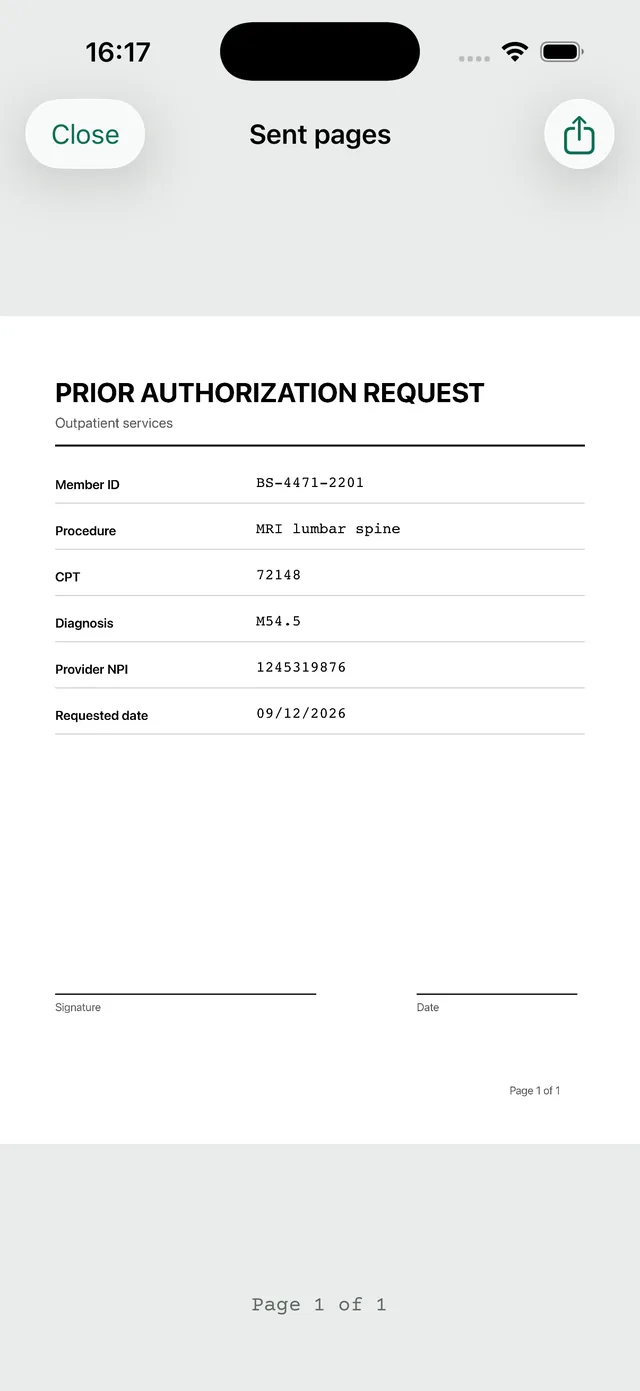
A fax machine prints in one bit per dot: every pixel is black or white, nothing in between. A light pencil signature, a grey table border or a photo of an ID card can disappear or turn into a black block on the way. Faxvio draws every page that way before you pay, in the browser and in the app, so you can rescan a page or darken it while it still costs nothing.
The app goes one step further on paper: point the iPhone camera at the form, and Faxvio finds the edges, straightens the page and converts it to the black and white the receiving machine uses. On a Mac, drop a PDF on the window. Either way, the document stays on your device until you press Send, and it is removed from our server as soon as the fax carrier accepts it.
To try the same check on any file, open the fax preview tool; it runs in the browser and uploads nothing.
Questions about Dropbox Fax, answered
Is Dropbox Fax free?
For the first 5 pages. Dropbox Fax's pricing page says "The free plan comes with 5 free fax pages. When you run out, it's only $0.99 / fax for faxes up to 10 pages and $0.20 for every page after." and its plan notes add: "Free pages are a one-time allowance for sending." Receiving faxes needs a paid plan.
Faxvio's free offer is one page, once per email address and browser, when you first sign in on the web.
Is Dropbox Fax cheaper than Faxvio?
For a fax to a US number, yes. After the free pages, Dropbox Fax charges $0.99 for a fax of up to 10 pages, against $1.09 for 3 pages and $1.99 for 7 on Faxvio; a 20-page fax is $2.99 on Dropbox Fax and $4.99 on Faxvio.
Faxvio fits better when the fax goes abroad, where it charges one page per page in all 37 of its countries while Dropbox Fax says pages depend on the destination; when the office wants a PDF receipt with a transmission ID; and when you are on a phone and want to scan the page with the camera.
Can Dropbox Fax send a fax internationally?
Yes, to the countries it supports. Its plan notes say "Send faxes to supported countries around the world. The number of pages used depends on the destination." and "Extra pages cost more, and international rates vary." The pricing page loads the list of countries with a script, so we do not count it here. Faxvio's 37 countries are listed on its destinations page, each at one page per page.
Do I need a Dropbox account to use Dropbox Fax?
Dropbox Fax's own FAQ describes sending as logging in to your Dropbox Fax account and choosing "Send a fax". Faxvio on the web asks you to sign in with Google, Apple or a 6-digit email code at the moment you press Send; adding the pages, checking the number and seeing the price come first. The Faxvio app for iPhone, iPad and Mac has no account at all.
How do I know a Dropbox Fax arrived?
Dropbox Fax sends an email confirmation with the transmission status. Faxvio shows Delivered only after the receiving machine confirms every page and issues a PDF receipt with the time, the number, the page count and a transmission ID, the kind of proof a tax office, a court clerk or an insurer asks for. Read what each field proves on fax confirmation, explained.
Can Dropbox Fax receive faxes?
Yes, on a paid plan. Its pricing page says "Receiving faxes is available for paid accounts." and that you can keep your own number or pick a new one with an area code in the US, the UK or Canada. Faxvio does not receive faxes: it has no number, and it says so before you buy anything. If you need both directions, Dropbox Fax's Home Office plan at $9.99 a month is built for that; if you only send, page packs cost nothing between faxes.
How fast is Faxvio?
About a minute. Faxvio measured a median of 66 seconds from Send to Delivered on real sends in September to November 2026, about 35 seconds a page on average, and 79% of faxes delivered in under two minutes. Dropbox Fax does not publish a delivery time on its pricing page, so we print none for it.
Bottom line
For a fax to a US number, Dropbox Fax costs less: $0.99 a fax of up to 10 pages after 5 free ones, against $1.09 for 3 pages on Faxvio. Faxvio fits better for a fax abroad at a price known before you pay, for a PDF receipt with a transmission ID, and for sending from an iPhone or a Mac with the camera. Prices as of 3 November 2026.
Send your fax from hereRead next
Other comparisons, the price data behind them, and the tools that check a fax before you pay.
- All fax service comparisonsFaxZero, eFax, Fax.Plus and Dropbox Fax next to Faxvio.
- FaxZero vs FaxvioFree up to 3 pages, $3.29 a fax after that.
- How to fax from a computerWindows, Mac and Chromebook, in the browser.
- The 37 countries Faxvio sends toOne price per page, with each dialling rule.
- International fax number formatterThe +country form of any fax number, before you send.
- Fax prices in 2026Stores, websites and apps, each price with its source.